Introduction
I recently decided to digitize the books I’ve read the last 10 years with the intent of making the content searchable so I don’t have to spend time going through the index/remembering what ideas were on which pages to help better solidify my understanding and also to have LLM recommended next books to read based on the content of my reading history, not just the title and related books.
The project breaks down into three layers:
- Acquisition: photography of every page
- Understanding: LLM-powered OCR that outputs semantically-rich JSON (HTML, figures, highlights, footnotes, page numbers…)
- Retrieval-Augmented Generation (RAG): an Elasticsearch vector index plus an Open WebUI function that lets me chat with my entire library
Only displaying some of the unique steps here as the rest of the code is pretty standard from quickstarts for Elasticsearch and llama index
Camera setup
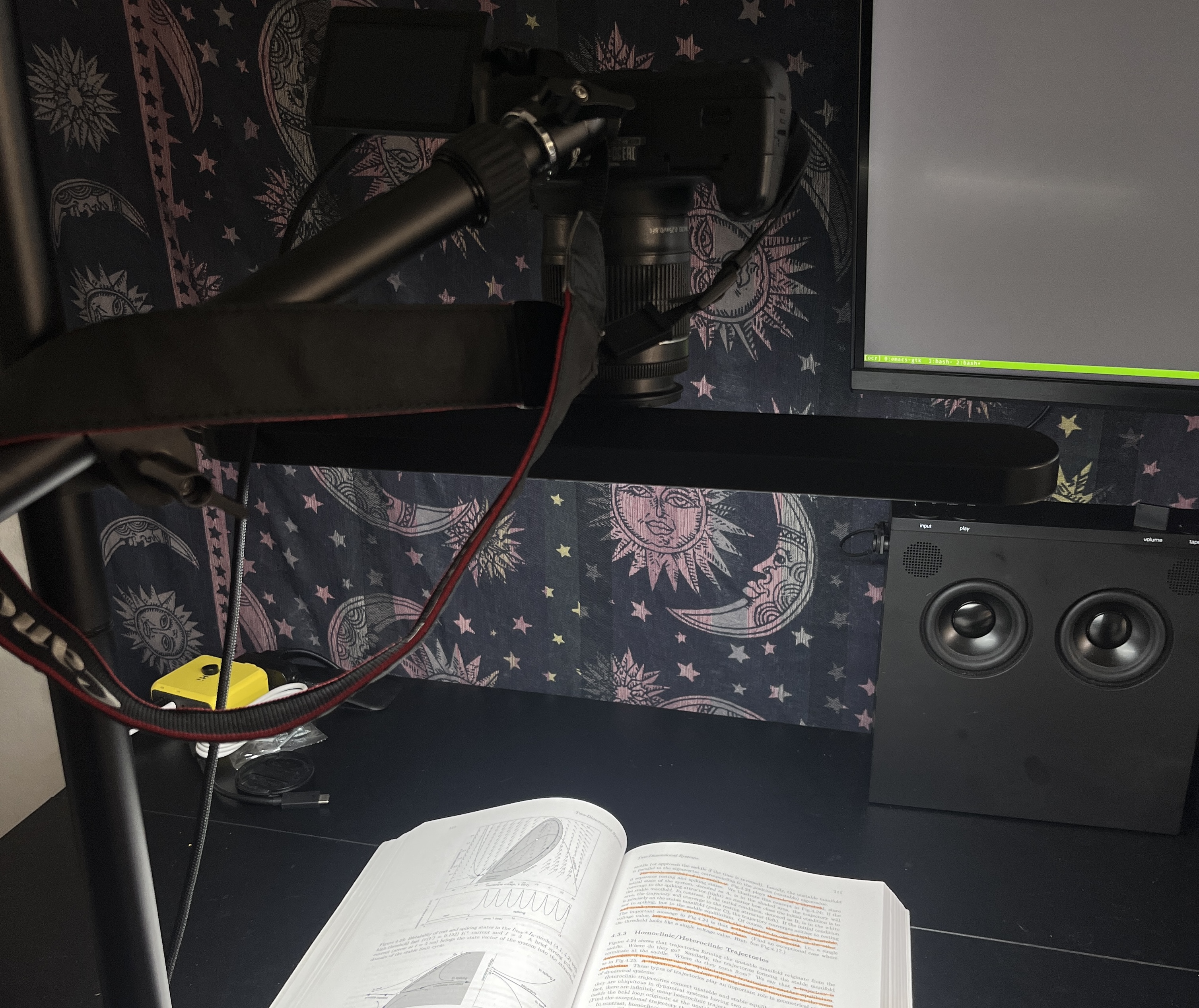
I used my old Canon Rebel T5i fix mounted to my desk along with an LED light connected to my desktop using a Mini USB to USB-C cable and gphoto in bash to automate a timer taking a picture every 6 seconds which allowed me enough time to flip through each page of the book which outputs to a book-specific directory in an input subdirectory
gphoto2 --capture-image-and-download --force-overwrite --filename "$DEST/%Y%m%d_%H%M%S.%C" --interval 6OpenAI Batch OCR
Used OpenAI’s gpt-4o-mini model plus batch requests to send each image with a structured Pydantic schema to fill out containing the HTML of the page content, figures/images, and highlighted text
| Stage | Key function(s) | What happens |
|---|---|---|
| 1. Pre-process | crop, split | Perspective-correct, crop both pages, detect centre gutter and save left/right images. |
| 2. Batch OCR | run_batch_ocr → OpenAI Batch API | Each page is encoded to base-64, wrapped in a BookOCR Pydantic schema, and submitted in ~170 MB JSONL chunks. |
| 3. Post-process | read_batch_response, parse_objects | Responses are validated back into Pydantic, objects/figures are cropped out and saved, token costs are tallied. |
BookOCR pydantic model that forces well-formed HTML and image placeholders (<img src="Figure 3-2">), so later scripts can inline saved crops
class Object(BaseModel):

    name: str = Field(description='The object name, sometimes denoted by just a single word/phrase or the bold word "Figure" and a hierarchical number like "Figure 1.x.x"', default='')
    description: str = Field(description='The object description (if available) of text below the name.', default='')
    bounding_box: BoundingBox = Field(description='Bounding box coordinates of the object.')
    index: int = Field(description='Index integer starting from 0 at the top of the page and increasing downwards', default=-1)


class Highlight(BaseModel):

    text: str = Field(description='The color highlighted text', default='')


class BookOCR(BaseModel):

    html: str = Field(description='Formatted output HTML of the image as a single text string', default='')
    objects: list[Object] = Field(description='List of objects in the image. This includes images, figures, or subsections.',default=[])
    content_text: str = Field(description='Text content of the main content without any other captions or references or footnotes', default='')
    highlights: list[Highlight] = Field(description='List of color highlighted text phrases or sentences often in colors such as yellow, orange, pink, blue, etc.', default=[])
    footnotes: str = Field(description='Text content of the footnotes (near bottom of page) content without any other captions or references or footnotes', default='')
    page_number: int = Field(description='Optional if found integer page number of the book', default=None)
System prompt:
SYSTEM_MSG = """
You are an expert OCR and layout analyst. When processing an image, use the defined JSON schemas (BoundingBox, Object, Highlight and BookOCR) as guidance for your structured output. Your output must be a well-formed HTML fragment (including <html> and <body> tags) that preserves headings, paragraphs, lists, tables, images, figures, and figure captions.

Extract images or any figures by obtaining their name, caption, bounding box, and page offset index. For each detection, output only the bounding box information in the format <x1><y1><x2><y2>. If the figure/image is only text, do not output a Object.

When inserting images into the HTML, tag them using the <img> element with a placeholder for the src attribute. Instead of a generic placeholder, incorporate the Object.name value so that each <img> tag looks like <img src="{Object.name}" alt="{Object.name}"/>. This links the parsed objects/images by their common name in the HTML, enabling downstream browsers to correctly load the images.

Extract any highlighted text phrases or sentences.
"""
Elasticsearch Vectorstore
Indexed all text content from JSON documents output from OCR step to use for RAG search
For each document:
- Strips text from the
htmlfield with BeautifulSoup. - Embeds with all-MiniLM-L6-v2 (384-dim).
- Indexes twice:
books– global corpus.books_<slug>– per-book index for scoped search.
Mappings include both a dense_vector field and redundant metadata.page_number / num_objects so RAG results can cite page numbers immediately
Open WebUI Function
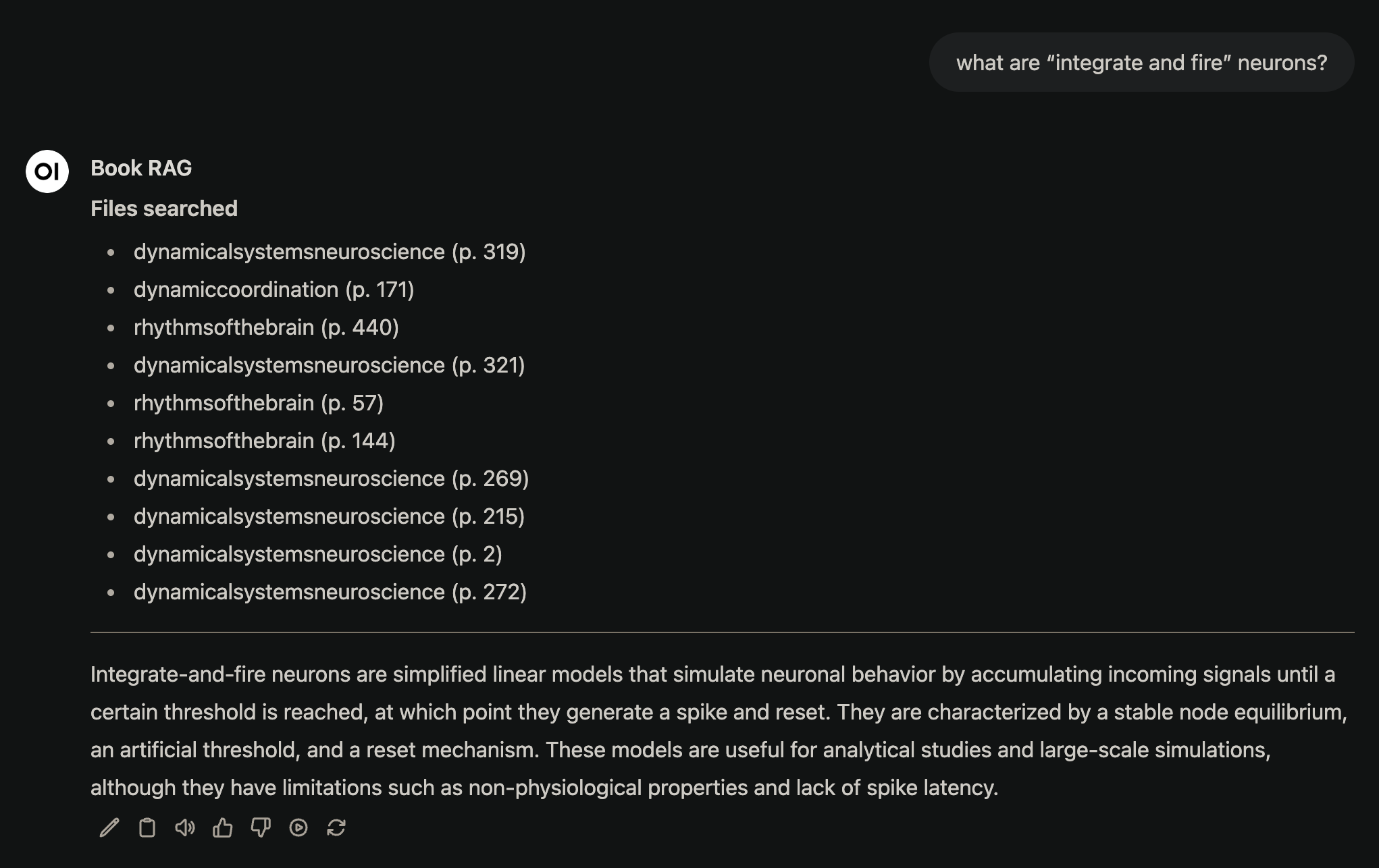
Finally, for using the vectors within a chat I built an Open WebUI function that performs RAG search over the indexed book pages given a query
- Uses the
RetrieverQueryEnginefrom llama index with tree-summarize mode to turn the top-k pages into a tidy, hierarchical answer - Switch between global or single-book search by filling the
bookvalve inside the chat - Ships as a simple plugin (
plugin.json) so any model chatting in WebUI can call it without code changes